
Client: Client X
Delivery partner: DevXo
Product: CloudOps — a read-only operational assistant in Slack
Focus: Kubernetes troubleshooting, AWS cost visibility, DevOps workflows, ChatOps
Modern DevOps teams rarely suffer from a lack of data.
They already have metrics, logs, alerts, dashboards, cloud consoles and cost reports.
The harder problem is often that all of this information lives far away from the place where decisions are actually made.
For Client X, that place was Slack.
After we modernized the client’s analytics platform around Amazon EKS, RDS and GitOps, the next challenge was no longer whether the infrastructure could run reliably.
It was how quickly the team could understand what was happening when something went wrong — and how early they could see cloud costs moving before the invoice arrived.
That is why we built CloudOps: a read-only AI assistant for Kubernetes and AWS, designed to bring live operational context directly into Slack.
No deploy buttons.
No production mutations.
No second admin console.
Just live infrastructure data, interpreted where the team already works.
Kubernetes troubleshooting in Slack
An engineer can ask CloudOps a normal question in the same channel where an incident is already being discussed.
CloudOps then queries the live Kubernetes environment through read-only access and returns the relevant context directly in the thread.
That can include:
- unhealthy pods;
- pod descriptions;
- Kubernetes events;
- recent logs;
- namespace and resource information;
- a short AI-generated explanation based on the live data.
If an engineer pastes an Alertmanager notification containing details such as namespace and pod name, CloudOps can retrieve the relevant logs and events and produce a concise incident summary.
The goal is not to replace engineering judgment.
It is to shorten the path from:
alert → evidence → hypothesis
Instead of opening several tools and running multiple commands manually, the investigation can begin with one message in Slack.
From alert to cause without another console
Before CloudOps, a Kubernetes incident could mean:
- open the alert;
- open the Kubernetes interface;
- find the correct namespace;
- locate the affected pod;
- inspect events;
- retrieve logs;
- ask the engineer who knows that part of the platform best.
CloudOps compresses that process.
The engineer stays in the incident conversation while the assistant brings the relevant infrastructure data into the same thread.
That reduces context switching without hiding the underlying evidence.
The team still sees what Kubernetes is reporting.
They simply reach it faster.
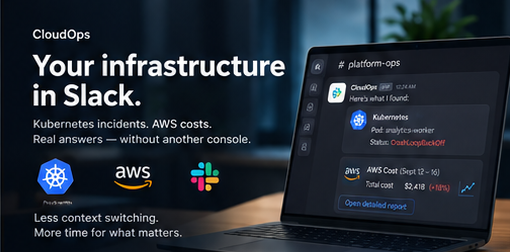
AWS cost monitoring in Slack
We applied the same principle to cloud spend.
For a selected period, CloudOps can publish an AWS cost canary directly in Slack, showing:
- total spend;
- comparison with the previous period;
- the main cost drivers;
- where the change came from;
- persistent tables and graphs for further review.
For Client X, two views were especially useful.
The first covers the overall AWS bill.
The second focuses on S3 GET requests and NAT Gateway traffic — cost lines that were actively influencing the invoice.
The numbers come from AWS Cost Explorer and related AWS read-only APIs.
The model does not estimate or invent the bill.
It interprets the real figures returned by AWS.
That distinction matters.
CloudOps can explain why a cost line moved, but the source of truth remains the underlying cloud platform.
Why CloudOps is read-only by design
One of the most important architectural decisions was defining what CloudOps should not be able to do.
CloudOps cannot:
- deploy applications;
- restart production workloads;
- mutate Kubernetes resources;
- change AWS infrastructure;
- execute Argo CD actions;
- turn Slack into an alternative control plane.
Deployments remain in GitOps.
Infrastructure changes remain in the systems designed to control them.
Slack remains the place for communication and operational visibility — not privileged production control.
This boundary was not an afterthought.
It was part of the design from the beginning.
More visibility without more blast radius
Every engineer can use the same CloudOps interface.
That does not mean every engineer receives broader production privileges.
The assistant exposes operational context through controlled, read-only access.
That gives the team more visibility without creating another route for production changes.
For Client X, this meant the tool could be useful to the whole engineering team without distributing high-privilege credentials through chat or giving everyone cluster-admin access.
More visibility does not have to mean more blast radius.
How the AI assistant works
Under the hood, CloudOps connects to live, read-only infrastructure tools.
These include:
- the Kubernetes API;
- AWS Cost Explorer;
- selected AWS
describeandgetoperations; - a controlled AI agent layer.
Credentials are not passed through Slack messages.
When an engineer asks a question in plain language, the model uses the relevant tools to obtain the current infrastructure state before producing an answer.
For example:
Why is this pod Pending?
or:
Why did NAT Gateway cost increase this week?
The model does not guess.
It retrieves the relevant data first and then turns that data into a concise explanation.
That is where the AI layer adds value: interpretation and context, not invention.
What changed for Client X
The value of CloudOps is not that the client “has a bot.”
The real change is operational.
Before CloudOps
An incident often meant opening multiple tools, finding the right resource and involving whoever knew the cluster best.
Cloud-cost changes were easier to notice during periodic reviews or after the invoice arrived.
Operational knowledge naturally concentrated around a small number of people.
After CloudOps
A Kubernetes alert can become a Slack thread containing the relevant logs, events and a short report.
AWS cost movements can appear in the same environment where engineers already discuss system behaviour.
The same workflows are available to the whole team.
And because the system is read-only, wider access to information does not introduce wider mutation rights.
The business impact
CloudOps changed several things at once:
- fewer context switches during incidents;
- faster access to Kubernetes evidence;
- less dependency on individual engineers;
- shared operational visibility;
- earlier awareness of AWS cost changes;
- easier discussion of infrastructure and cost in the same workflow;
- no additional production-control surface in Slack.
The result is a shorter path from signal to decision.
And in infrastructure operations, that distance matters.
CloudOps as the second half of platform modernization
CloudOps did not appear in isolation.
It sits on top of the platform work already delivered for Client X:
- Amazon EKS instead of a fleet of separate VMs;
- GitOps-based delivery;
- managed PostgreSQL on RDS;
- private networking;
- IAM-based workload identities;
- separated production, recovery and engineering systems;
- centralized monitoring.
The first phase made the infrastructure more predictable.
CloudOps makes that infrastructure easier for the team to understand and operate every day.
Modernizing the platform is only part of the job.
The people operating it still need fast access to the information that matters.
Why ChatOps matters for modern DevOps teams
Kubernetes and AWS already expose enormous amounts of operational data.
The problem is not necessarily another missing metric.
Sometimes the real gap is between the place where the data exists and the place where the decision gets made.
ChatOps can help close that gap — particularly when it is designed with clear security boundaries.
For Client X, we brought together:
Kubernetes diagnostics.
Alert context.
AWS cost visibility.
AI-assisted interpretation.
All inside Slack.
All based on live data.
And all read-only.
The platform should be predictable during major changes.
Day-to-day operations should be fast.
CloudOps is the layer that connects those two goals.
DevXo — ambitious engineering, predictable infrastructure, and tools the whole team can actually use.
📞 Contact our team to see how we can help your business.